Expert Tips on How to Make Blender Render High Quality
Many artists encounter scenes that look impressive in the viewport but feel flat or unrealistic once rendered. The good news is that improving render quality often comes down to a series of small refinements rather than complex techniques or expensive hardware upgrades. Keep reading to learn the most effective ways to make your Blender renders look more realistic, polished, and professional.
Render Quality Begins Before Rendering
One of the biggest misunderstandings about Blender is that render quality is determined primarily by render settings. In reality, the rendering process is simply the final stage of a much larger workflow.
Even the most powerful rendering engine cannot compensate for weak composition, unrealistic materials, or poor lighting. Before adjusting technical settings, it’s important to evaluate the scene itself. Consider the following questions:
- Does the lighting create depth and visual interest?
- Do the materials react naturally to light?
- Are there enough details to make the environment believable?
- Are the objects realistic in scale and proportion?
- Does the camera angle showcase the scene effectively?
Addressing these elements often produces far greater improvements than increasing render samples or adjusting advanced settings.
Improve Your Lighting Setup
If there is one area that consistently separates amateur renders from professional ones, it’s lighting. Lighting influences how viewers perceive shape, depth, texture, and mood. Even a highly detailed model can appear unrealistic if the lighting is poorly designed. Conversely, a simple scene can look remarkably convincing when illuminated effectively.
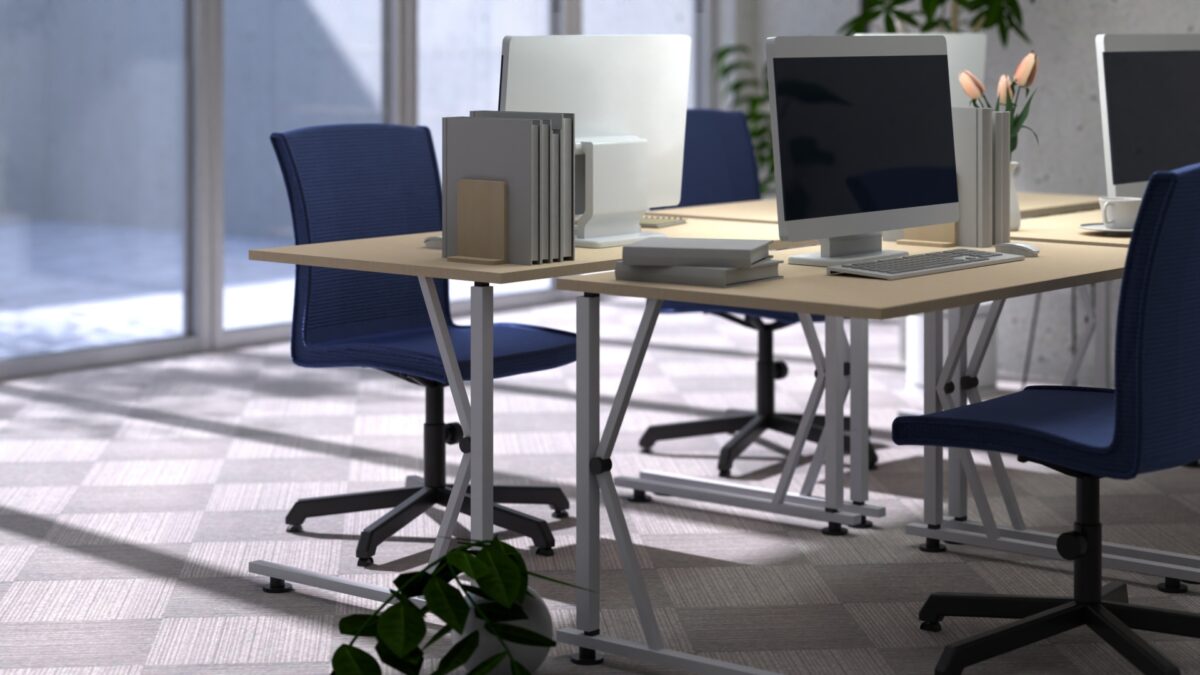
Real-world lighting is complex. Light bounces between surfaces, creates subtle reflections, softens shadows, and transfers color from one object to another. Recreating some of this behavior in Blender helps create a more realistic image.
A common mistake among beginners is relying on a single light source to illuminate an entire scene. While this approach may make objects visible, it often produces a flat and artificial appearance. Instead, many professional artists use multiple light sources that serve different purposes:
- A primary light that establishes direction and mood
- Fill lighting that softens harsh shadows
- Accent or rim lighting that highlights important details
- Environmental lighting that provides natural illumination
For interior scenes, realistic window lighting often produces better results than randomly placed artificial lights. Product renders frequently benefit from controlled studio-style lighting setups that emphasize shape and material quality.
Rather than focusing on the number of lights in a scene, focus on understanding the purpose of each light source.
Create More Realistic Materials
When creating materials in Blender, it’s important to think about how surfaces interact with light. Factors such as roughness, reflectivity, transparency, and color variation all influence how realistic a material appears in the final render.
One of the easiest ways to improve material quality is to avoid making surfaces look perfectly uniform. In the real world, materials often contain subtle variations in color, reflectivity, and texture. Even small adjustments to roughness values can make a surface feel more natural and believable.
Physically Based Rendering (PBR) materials are particularly useful because they simulate how real-world surfaces interact with light. Properly configured PBR textures can dramatically improve realism while maintaining consistency across different lighting environments.
Add Small Modeling Details
Many artists focus heavily on large objects while overlooking the geometric details that make a scene believable.
One of the most obvious indicators of a computer-generated object is the presence of perfectly sharp edges. In the real world, most objects have slightly rounded corners due to manufacturing processes, everyday use, and natural wear. Adding subtle bevels to hard edges can significantly improve realism by allowing light to interact with surfaces more naturally. These small adjustments create highlights and reflections that help define an object’s shape, making models appear more believable in the final render.
Realistic scale is equally important when creating believable renders. Objects that are slightly too large or too small can make a scene feel unnatural, even if viewers cannot immediately identify the problem. Using real-world measurements, reference images, and Blender’s measurement tools can help maintain accurate proportions throughout a project.
Consistent scale also affects lighting and materials. Reflections, shadows, and depth-of-field effects often appear more realistic when objects are modeled at their correct size. Taking the time to verify proportions can significantly improve the overall quality of a render.
Use Better Camera Composition
A technically accurate render can still feel underwhelming if the composition is weak. The camera determines how viewers experience a scene. It controls focus, visual hierarchy, and emotional impact. Professional artists often spend considerable time refining camera placement because composition can dramatically influence the quality of the final render. Several factors contribute to stronger composition:
- Camera angle
- Focal length
- Framing
- Depth of field
- Subject placement
A slight adjustment to the camera position can dramatically change the final image. The right angle can make a product appear more premium, make an environment feel larger, or create a stronger sense of drama. This is one reason why studying photography techniques can be valuable for Blender artists, as many of the same principles apply to 3D rendering. When evaluating a scene, do not focus solely on the objects themselves. Consider how the camera presents those objects to the viewer and whether the composition effectively guides the viewer’s attention.
Realism Comes from Observation
The most successful Blender artists are not necessarily those who memorize every setting or feature. Instead, they are often the artists who pay close attention to how the real world behaves. By observing how light interacts with different surfaces, noticing imperfections in everyday objects, and understanding how cameras capture images and materials respond to different environments, they are able to create more convincing renders. Blender is simply a tool. Realism comes from observation and thoughtful artistic decision-making.
When evaluating a render, it’s often more productive to ask, “What is missing from this image?” rather than “Which setting should I increase?” The answer may be improved lighting, more realistic materials, stronger composition, or additional modeling details.
Improve Your Blender Rendering Workflow
High-resolution textures, advanced lighting setups, particle systems, and animations can place substantial demands on your hardware, making it difficult to iterate quickly and meet project deadlines.
For artists who need additional rendering power, cloud rendering services such as Render Pool provide a practical solution. Supporting Blender Cycles and Eevee, Render Pool distributes rendering tasks across high-performance servers, helping reduce render times while freeing up your local workstation for other tasks. This can be especially beneficial for animation, architectural visualization, and commercial projects where both quality and efficiency are important.
Creating Higher-Quality Blender Renders
Improving Blender render quality is an ongoing process of refinement. There is no single setting or shortcut that instantly produces professional results. The strongest renders are typically created through a combination of thoughtful lighting, realistic materials, detailed modeling, effective composition, and optimized rendering workflows.
Many of the improvements that separate professional renders from average ones are subtle. Viewers may never consciously notice them, but those small details work together to create images that feel realistic, polished, and visually compelling.
By focusing on both the artistic and technical aspects of Blender, you can consistently create higher-quality renders that stand out and better communicate your creative vision.
And when your projects require more performance than your local machine can handle, cloud rendering services such as Render Pool provide an effective way to scale your rendering capacity and complete projects faster. Ultimately, faster rendering means less time waiting and more time focused on creating exceptional 3D work.